- What is compilation and why it matters
- What happens during preprocessing
- How compiling converts code to assembly
- What assembling does with assembly code
- How linking creates the final executable
- The complete compilation flow from .c to .exe
What is Compilation?
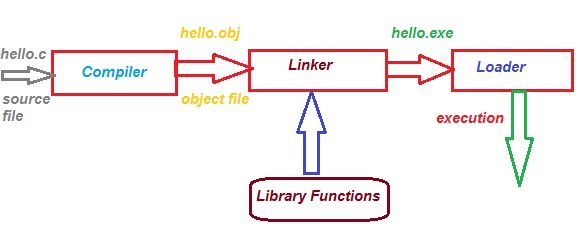
A compiler is a program that translates code written in one language (source code)
into another language (target code). For C programs, the compiler translates your .c file
into an executable .exe file.
Think of it like a translator — you write instructions in English (C code), and the compiler translates them into machine language (0s and 1s) that your computer understands.
💡 Key Point: The compilation process converts hello.c → hello.obj → hello.exe
The Four Steps of Compilation
Preprocessing
.c → .i
Compiling
.i → .s
Assembling
.s → .obj
Linking
.obj → .exe
Step 1: Preprocessing
Preprocessing is the first step. The preprocessor handles all lines starting with #
(like #include, #define, #ifdef). It creates an intermediate file with a .i extension.
What happens during preprocessing?
- Comments Removal: All comments are removed — they're only for humans, not machines.
- Macros Expansion: Macros like
#define PI 3.14are replaced with their values. - File Inclusion: Header files like
stdio.hare inserted into the code. - Conditional Compilation: Code blocks with
#ifdef,#endifare processed.
Example of comments removal:
#include <stdio.h>
int main()
{
// this is a single-line comment
printf("Hello World!");
return 0;
}
Example of Macros Expansion:
#define G 9.8
/* Defining an expression */
#define SUM(a, b) (a + b)
Example of Conditional Compilation:
// #define GRAVITY 18
int main()
{
/* if GRAVITY is defined then print the value */
#ifdef GRAVITY
printf("Gravity is %d", GRAVITY);
#else
printf("Not Defined");
#endif
return 0;
}

Step 2: Compiling
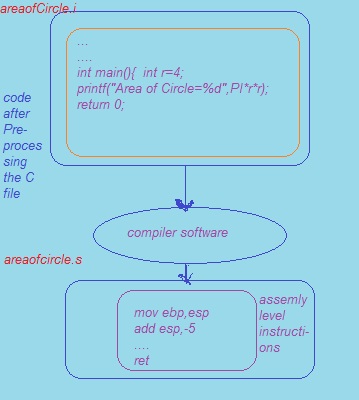
The compiling phase takes the preprocessed .i file and converts it to
assembly code (a .s file). Assembly code is a low-level, human-readable
language that's one step above machine code.
During this phase, the compiler checks for syntax errors. If there are mistakes in your code, the compiler will show error messages in the terminal.
Step 3: Assembling
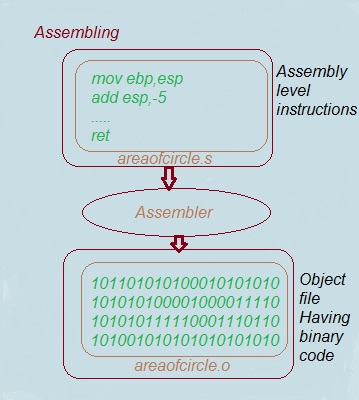
Assembling converts the assembly code (.s) into machine code
(0s and 1s). The result is an object file with a .obj extension on Windows
or .o on UNIX systems.
What is an Assembler? An assembler is a program that translates assembly language into binary code that the computer's processor can understand.
Step 4: Linking
Linking is the final step. The linker combines your object file with library files
(like .lib files) to create the final executable file (.exe on Windows,
.out on UNIX).
What is a Linker? A linker is a program that takes object files and library files and combines them into a single executable file.

Compilation Flow Diagram
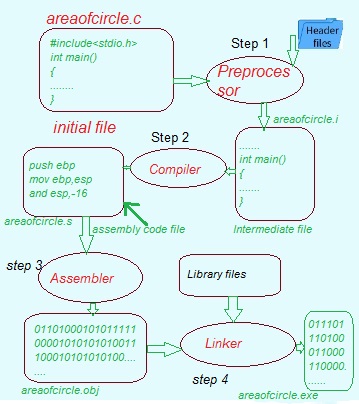
🎯 Key Takeaway: The compilation process turns your human-readable C code into a machine-readable executable file. Each step has a specific purpose, and all four are essential.
Frequently Asked Questions About Compilation
1. What is the difference between a compiler and a linker?
A compiler translates source code into machine code. A linker combines multiple object files and libraries into a single executable file.
2. Why do we need preprocessing?
Preprocessing handles directives like #include and #define. It makes code reusable and easier to maintain.
3. What is the difference between .obj and .exe files?
.obj (object file) is the output of assembling — it contains machine code but isn't fully executable. .exe is the final executable file after linking.
4. Can I skip the preprocessing step?
No. Preprocessing is automatic and essential. You can't skip it — the compiler handles it automatically.
💡 Quick tip: Understanding the compilation process helps you debug errors more effectively and appreciate what happens behind the scenes.